Report Description
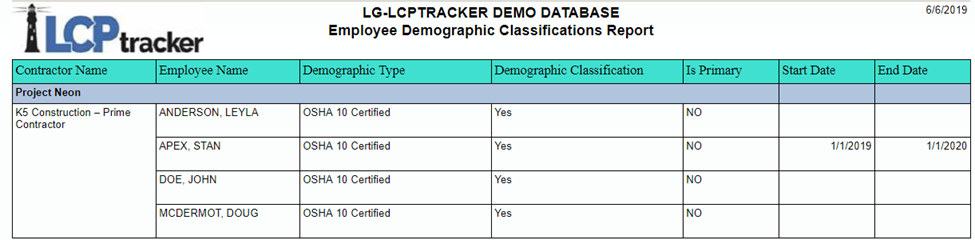
This report will display employee’s demographic classification and type. A CPR does not need to be submitted or certified to run this report. It shows the following information:
- Contractor name.
- Sub to.
- Employee name.
- Demographic type.
- Demographic classification.
- Start Date.
- End Date.
Preconditions
- Demographic classifications need to be selected by contractor under Employee Setup.
- Project needs to be assigned.
- To display the dates, the start and end dates must be entered at time of demographic setup.
- Report can run for all employees, only employees with CPRs or only employees without CPRs.
NOTE: See 'Appendix A' on demographic classifications.
Parameters

Report Sample
Was this article helpful?
That’s Great!
Thank you for your feedback
Sorry! We couldn't be helpful
Thank you for your feedback
Feedback sent
We appreciate your effort and will try to fix the article