Report Description: this report was designed to display the new requirements for Section 3 Workers as well as Targeted Section 3 Workers. Based on the demographic classification selection for each employee and the assignment to a specific project, this report takes the hours for the project and generates the % of the employees that fit into one of the two categories for reporting to HUD.
Preconditions:
- Project must have a Section 3 Funding Type selection of PHA/PHFA – Public Housing Financial Assistance or Other Section 3 Funding including Housing & Community Development Recipients.
- Section 3 Demographic Classifications need to be enforced for the project you are reporting on to ensure all employees have a selection.
- Each Section 3 Demographic Classification (DC) needs to be assigned to a project. If the employee works on multiple projects, multiple DC assignments need to be completed.
- If an employee was previously a Section 3 worker and then Section 3 no longer applies, the previous selection needs to have an end date and a new DC selection of “Sec. 3 no longer applies to worker for this project” needs to be assigned within the employee profile.
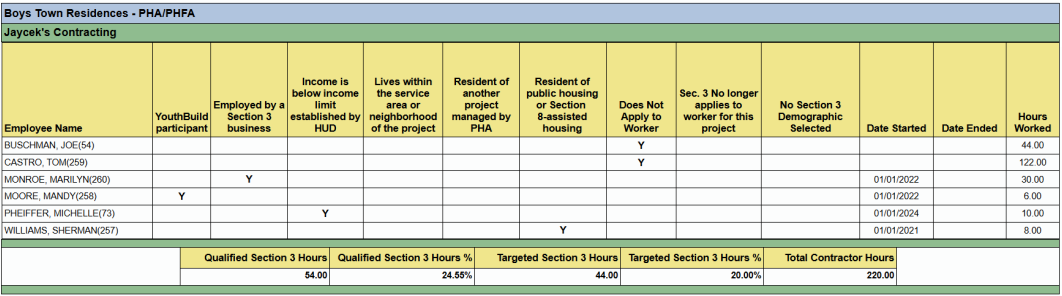
This report shows the following information:
- Project.
- Contractor.
- Employee Name.
- YouthBuild participant.
- Employed by a Section 3 business.
- Income is below income limit established by HUD.
- Lives within the service area or neighborhood of the project.
- Resident of another project managed by PHA.
- Resident of public housing or Section.
- 8-assisted housing.
- Does Not Apply to Worker.
- Sec. 3 No longer applies to worker for this project.
- No Section 3 Demographic Selected.
- Date Started.
- Date Ended.
- Hours Worked.
- Demographic Classifications.
- % of Section 3 Worker Hours.
- % of Targeted Section 3 Worker Hours.
Parameters: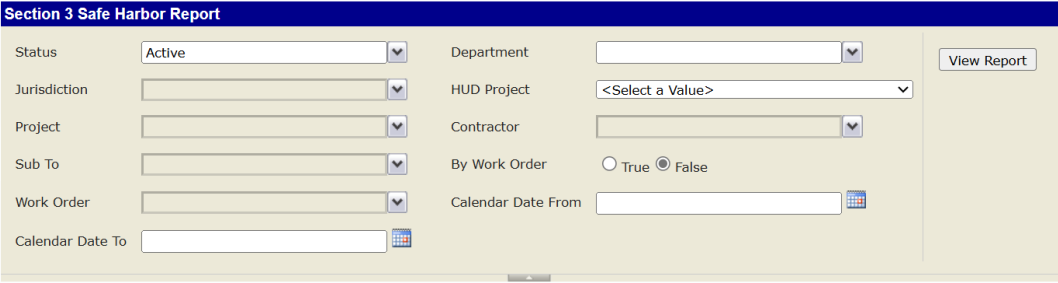
Note: the Admin will need to manually add professional service hours as the hours above only include hours from a
Certified Payroll Report (CPR).
Section 3 Safe Harbor Report Sample:

Was this article helpful?
That’s Great!
Thank you for your feedback
Sorry! We couldn't be helpful
Thank you for your feedback
Feedback sent
We appreciate your effort and will try to fix the article