Report Description
This report is used by agencies who track Section 3 new hire statistics. It contains the following information:
- Project Name.
- Project Code.
- Report Date.
- Date Range.
- Contractor Name.
- Sub To.
- Employee Name.
- Employee City.
- Employee Craft.
- Employee Hire Date.
- Employee Hours Worked.
- Hours Worked.
- Total Hired by Contractor.
- New Hire Hours Worked.
- New Hire Amount Paid to employee.
- Total Workers on Job.
- Total Hours Worked.
- Total Amount Paid.
- Percent of Number of New Hires.
NOTE:
- An employee is determined a Section 3 employee if the 'Current' option is selected in the 'Add/Edit Employees' page.
For an employee to be considered a new hire in this report, the employee must meet the following requirements:
- Have a hire date entered in the 'Add/Edit Employees' page.
- Their hire date must fall in between the dates entered in both the 'Hire Date From' and 'Hire Date To' parameters.
- They must have at least one (1) hour of recorded payroll for the selected project(s) and contractor(s).
Parameters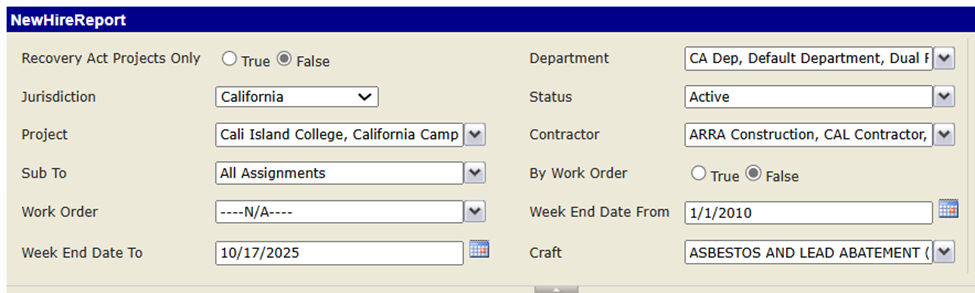
Report Sample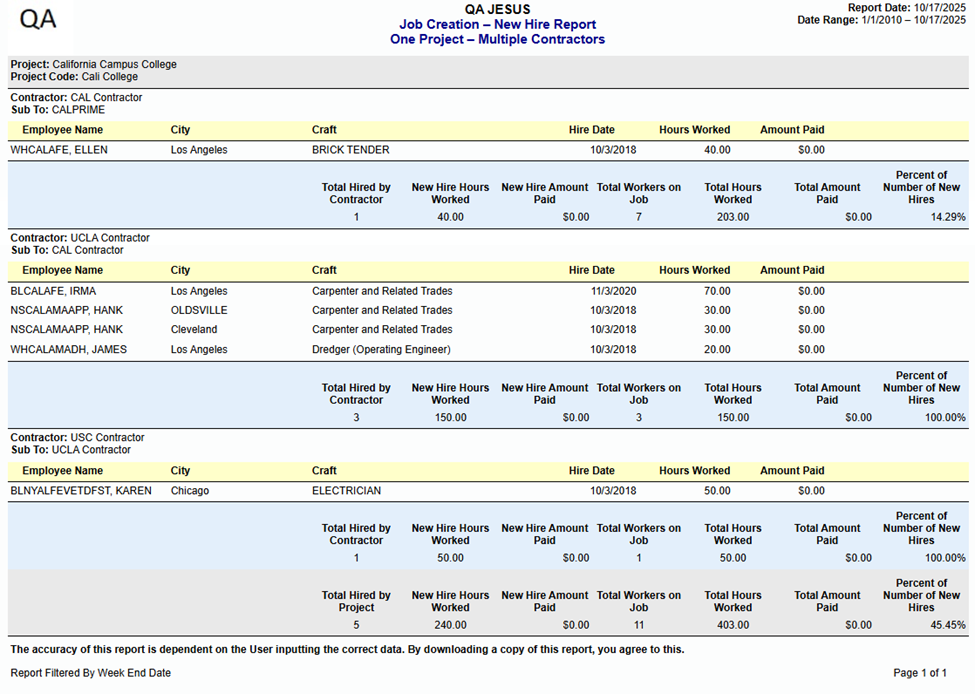
Was this article helpful?
That’s Great!
Thank you for your feedback
Sorry! We couldn't be helpful
Thank you for your feedback
Feedback sent
We appreciate your effort and will try to fix the article