LCPcertified – NYSDOL XML – R74.1, August 31st, 2026
Contractors can now generate the NYSDOL XML compatible file to submit certified payroll information with ease.
Contractors must set up a project on the NYSDOL system first. The following is handy information to have to be successful:
- Business’ employer identification number (FEIN) from the IRS.
- NYS contractor registration number (found on your Certificate of Contractor Registration).
- Prevailing wage case number (PRC Number) for the project.
- Copy of payment bond (for public improvement projects only)
Optional – when submitting XML files, use a consistent naming convention to organize and manage files.
- For example, TestProject_08102025.xml can be clearly identified as a file containing data for the project named Test Project and for the week ending date of 08/10/2025.
See below for account and project-level configuration required for successful file generation in LCPcertified and submission on the NYSDOL system.
Project Set Up
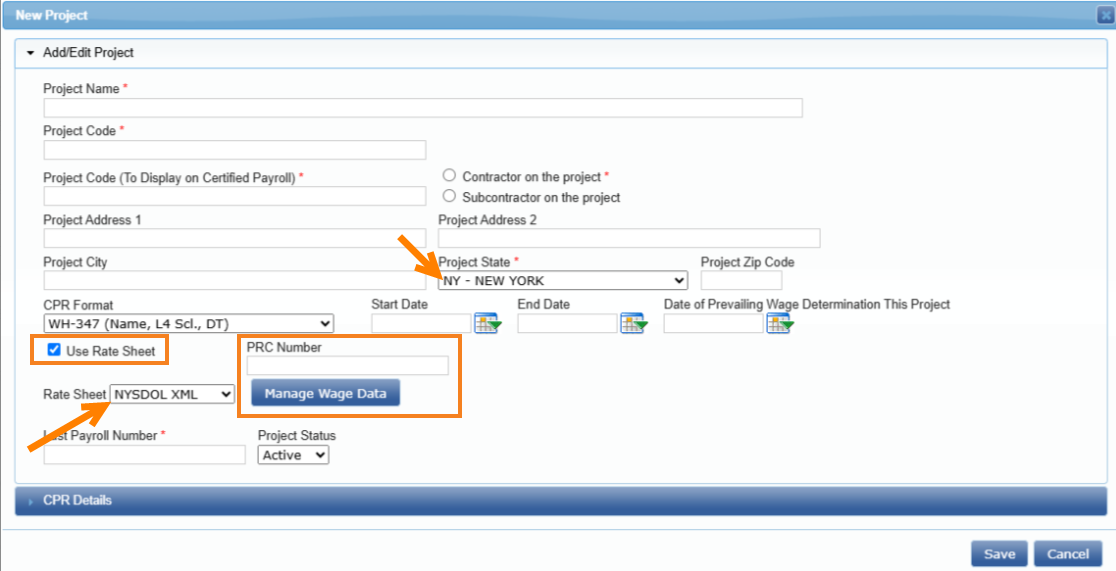
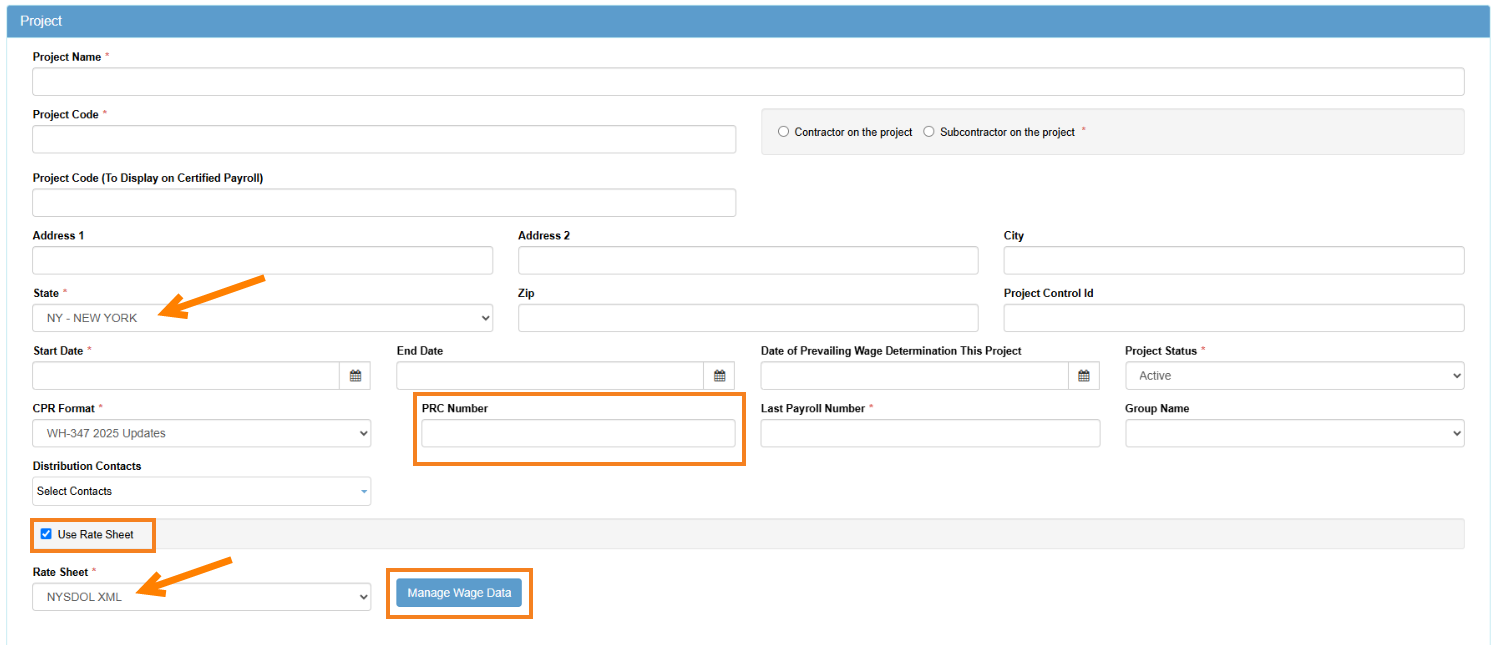
- Project state must be set to: NY – New York
- PRC Number (Prevailing Rate Case Number) must be entered
- This is a new field and unique 10-digit number assigned by the NYS Department of Labor Bureau of Public Work.
Note:
To produce an accurate NYSDOL XML file users must utilize the “Rate Sheet” feature by selecting the default NYSDOL XML rate sheet when setting up a project in LCPcertified Basic, Plus and Professional. This will allow for the XML file to display NYSDOL approved Craft and Classifications. However, if needed users will continue to have the ability to add craft and classifications manually.
LCPcertified Basic & Plus:
LCPcertified Professional:
Rate Sheet
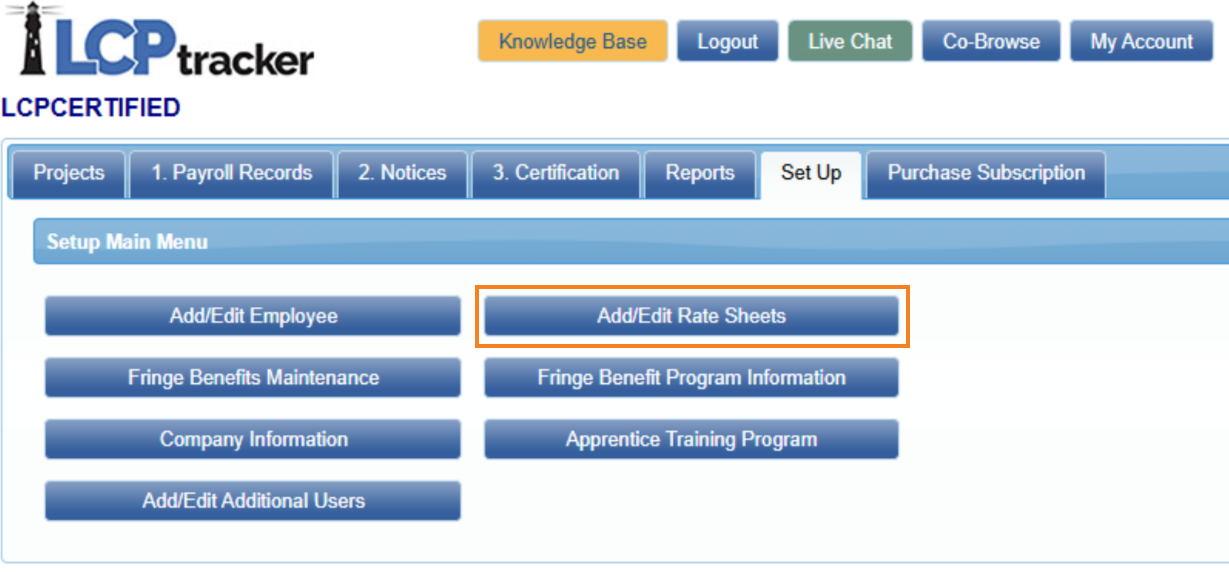
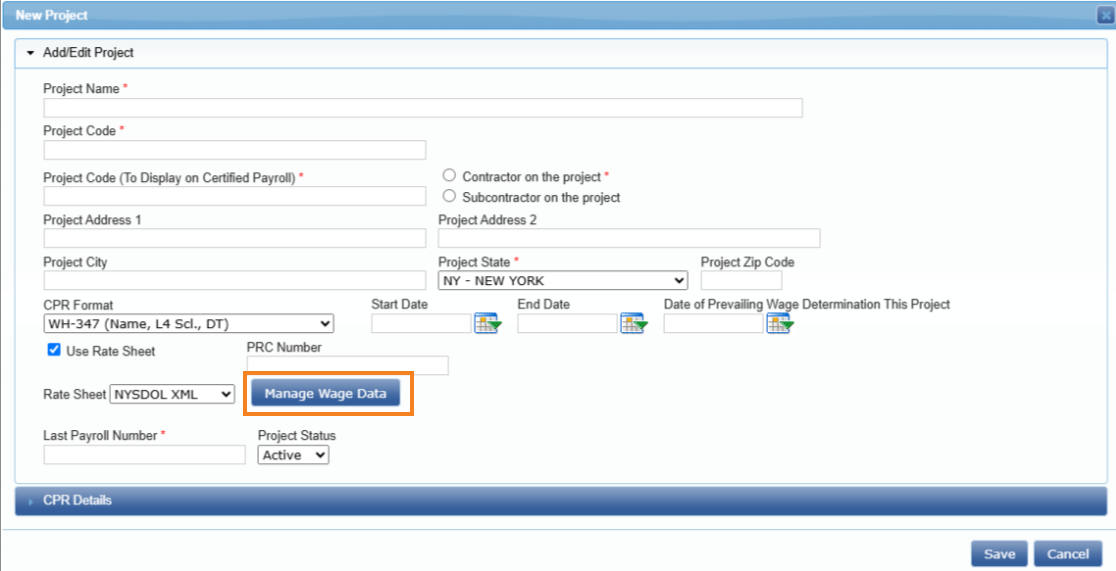
The default NYSDOL XML rate sheet can be accessed in two ways:
- Set Up tab > Add/Edit Rate Sheets page
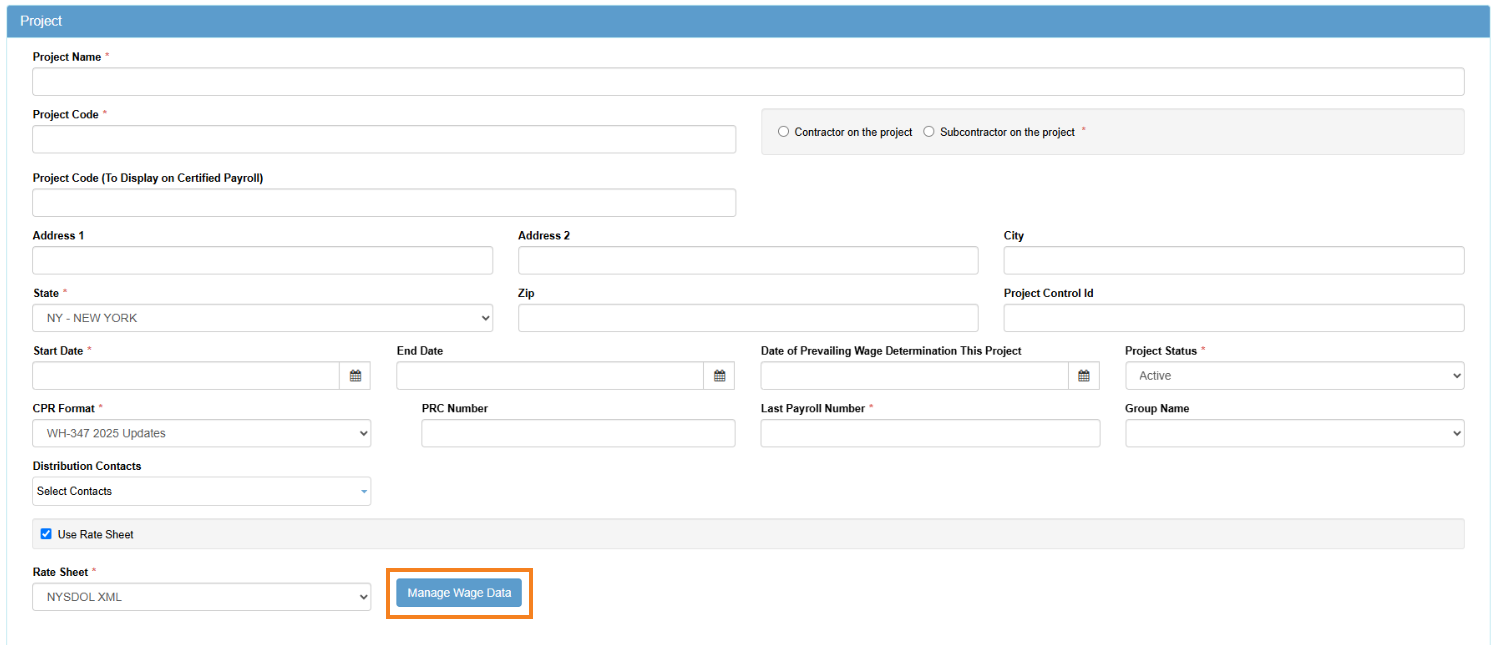
Or - Project set up page > Manage Wage Data button
Note:
- Default NYSDOL XML rate sheet cannot be renamed or deleted.
- Here users will be able to access currently matched LCPcertified available list of craft and classifications. If desired craft and classifications are not available on the default rate sheet, then users will have the ability to add it manually.
- Users can also create a ‘copy’ the existing default craft and classifications as a quick shortcut to save time.
- This will not replace the existing default craft and classification but instead create a copy of it.
You may contact our support team to make us aware, and we will work to ensure this is available in the future.
Set Up tab > Add/Edit Rate Sheets page
Project set up page > Manage Wage Data button
LCPcertified Basic & Plus:
LCPcertified Professional:
Apprentice Classification
Indicating whether employee is a NYS Registered Apprentice: (True/False) is required.
- When the word "Apprentice, apprentice, Appr, appr, App, app" is present in the Craft or Classification fields in the employee payroll record then, "True" will display on XML file.
- If there is not an employee classified using one of the above-mentioned “Apprentice, Appr or App” word variations, then “False” will displayed.
How to Create XML file
Contractors can continue to take advantage of the various options available in LCPtracker for entering payroll information.
- Manually
- Upload data using a compatible file if their internal IT team mapped the compatible upload file OR if their payroll system has an active integration with LCPcertified
- Direct Payroll Interface (DPI) service
Once on the Payroll Records page enter and review:
- Employee hourly work week data (Rate of pay, Hours worked)
- Supplemental payments (Fringes)
- Check information (Multiple checks, Deductions, etc)
Note:
State of New York craft and classifications selected in LCPcertified will be compared to the NYSDOL default craft and classification (work categories) list. *Unless the craft and classification have been entered manually by the user.*
- This is to match the selection in LCPcertified with the corresponding work category in the default list provided by NYSDOL.
- The matching craft and classification (work category) will be displayed on the XML file.
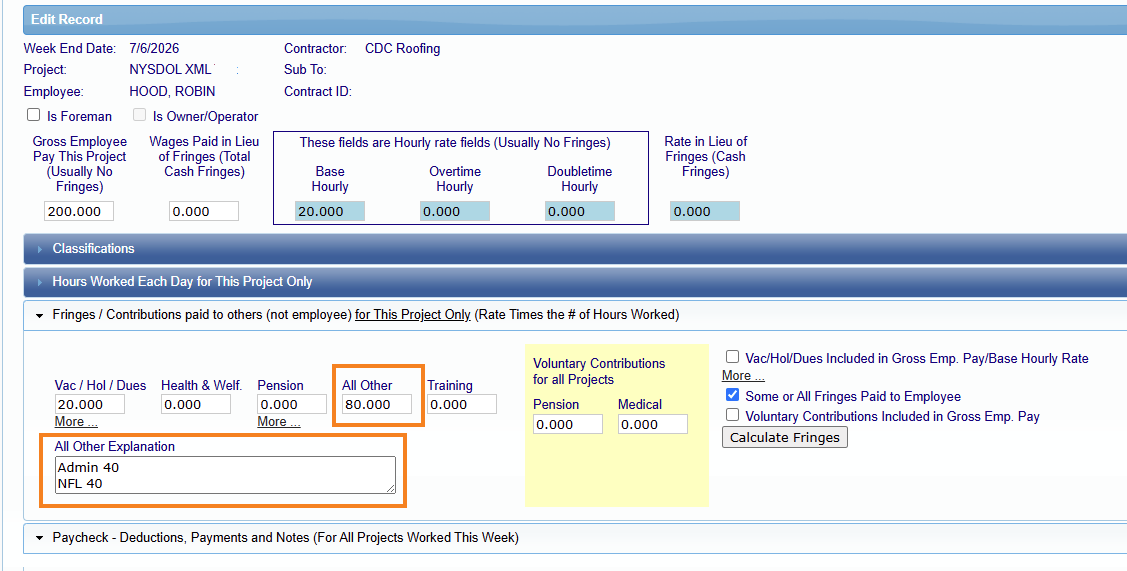
If ‘Other’ Supplemental Payment (Fringe) is reported, then “All Other Explanation” field is required.
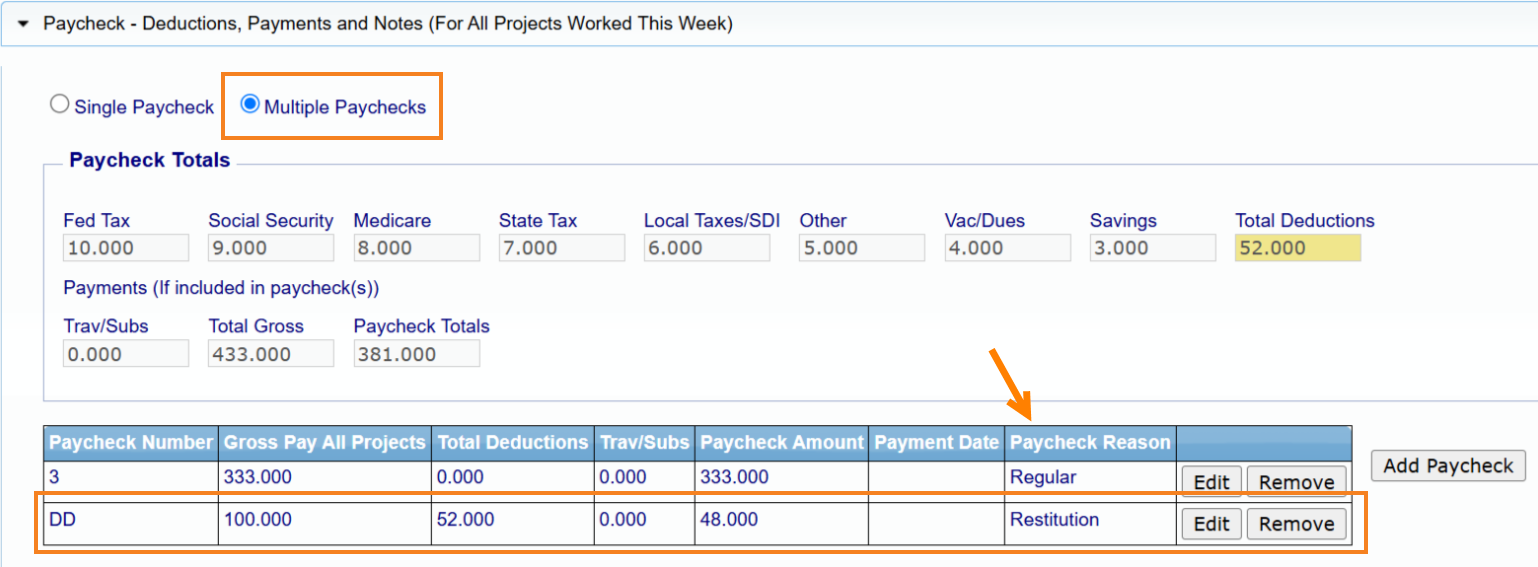
If a contractor enters multiple checks, the checks information (Deductions, Total Deductions, Gross all projects and Net) will be combined and appear as one set of values on the XML file. This is due to current NYSDOL system requirements which do not accept separate checks datasets.
Contractor users can make changes and recertify payroll data in LCPcertified (i.e. add Restitution check, update rate pay, check information, etc) and produce an up-to-date XML file. However, current NYSDOL system limitations do not allow updated XML files to be uploaded to the Payroll Portal.
- Contractors must contact the NYSDOL directly and request a "correction excel file" to make a correction for previously submitted CPRs.
- NYSDOL will provide the correction form and be responsible for attaching the corrected restituted file.
View XML file
LCPcertified Basic & Plus:
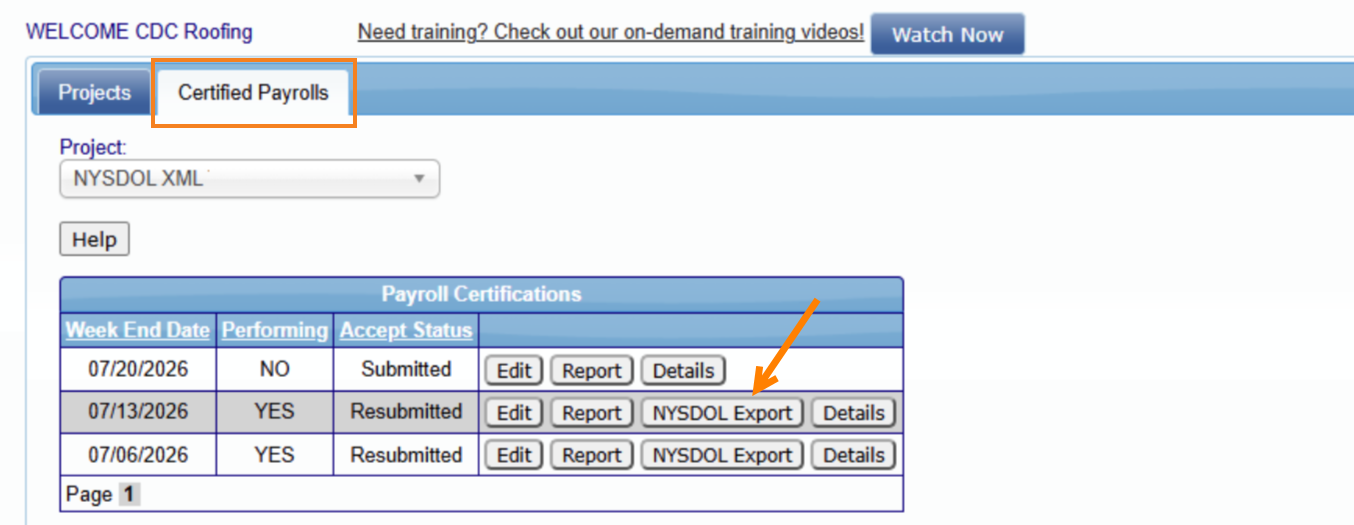
- Navigate to Projects tab and Certified Payrolls subtab. Once there you can click on NYSDOL Export button to view the XML file.
LCPcertified Professional:
- Navigate to Certification tab and Export Certified Payroll Report page. Once there you can click on NYSDOL Export button to view the XML file.
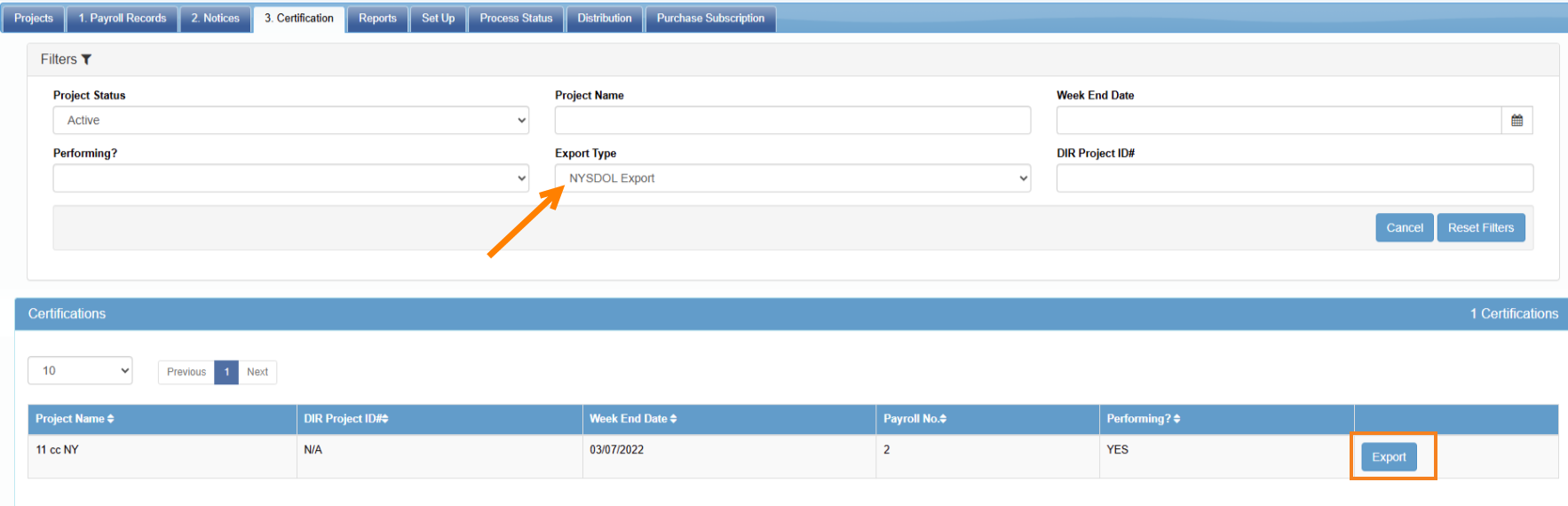
Note:
XML files are not generated for non-performance weeks. Per the current NYSDOL process, contractors are required to access the NYSDOL system and manually select the ‘No Work’ option on the project's weekly payroll dashboard.
Frequently Asked Questions
Can I use an API instead of XML upload?
- No, an API for the Certified Payroll portal is not available at this time.
Can I upload a CSV or spreadsheet instead of XML file upload?
- No. Currently, only XML is supported. This is the most universally accepted format for this type of data and is compatible with most payroll systems.
Is there a limit to the number of records I can send in a single file?
- Yes. You can only send up to 500 employee payroll records in a single file. If the file contains more than 500 employee payroll records, you’ll receive an error that the file exceeds the maximum number of records.
Can I submit a file for multiple projects at once?
- No, you can only send payroll data for a single project per file.
Can I submit a file for multiple weeks at once?
- No, you can only submit an XML file for a single week. Submitting multiple or mismatched payroll week ending dates will cause the file to fail.
Can I upload an updated XML file after initial submission?
- No, updates to the previously submitted payroll cannot be "fixed/corrected" by uploading an updated XML file.
- Contractors must contact the NYSDOL directly and request a "correction excel file" to make a correction for previously submitted CPRs.
- NYSDOL will provide a correction form and be responsible for attaching the corrected restituted file.
Why don’t I see employee’s check number or notes added in LCPtracker?
- XML schema set by NYSDOL currently does not allow check numbers nor notes as part of the XML.
Was this article helpful?
That’s Great!
Thank you for your feedback
Sorry! We couldn't be helpful
Thank you for your feedback
Feedback sent
We appreciate your effort and will try to fix the article