How to I-9 Verify, VAL_29
Agencies may choose to require you to verify you have a valid I-9 form on file for your employees.
Once you have entered your payroll records, for a pay period, a notice may appear that states, “Your employee needs to be I9 verified” (VAL_29). You can update this in Set Up>Add/Edit Employees. 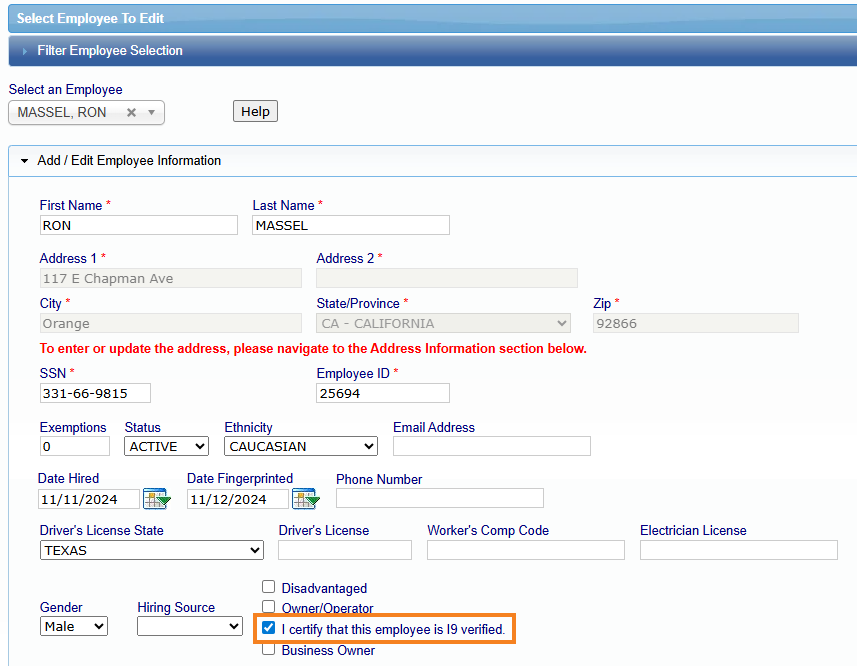
Select the employee from the drop-down list, and in the first section, check off “I certify that this employee is I-9 verified” and then click 'Save' at the bottom of the section.
Once that information has been updated in the employee setup, re-save the payroll record with that information, in '1. Payroll Records>Edit Uncertified Payroll Records>select the 'Project' and 'Edit' that employee, then click 'Save' at the bottom of the record.
Was this article helpful?
That’s Great!
Thank you for your feedback
Sorry! We couldn't be helpful
Thank you for your feedback
Feedback sent
We appreciate your effort and will try to fix the article