Report Description: this report will show hired employees based on “new hire” dates defined during project implementation. It contains the following information:
- Report Date
- Hire Date
- Project Name
- Contractor Name
- Jurisdiction
- Sub To
- Project Name
- Project code
- Project Start date
- Project End date
- Employee Name
- Employee City
- Employee Craft
- Employee Hire Date
- Employee Hours Worked
- Employee Amount Paid
- Section 3 Status
- Contractor Total New Hires
- Contractor New Hire Hours Worked
- Contractor New Hire Amount Paid
- Section 3 Total New Hires
- Section 3 Percent of Number of New Hires
- Section 3 New Hire Hours Worked
- Section 3 New Hire Amount Paid
- Contractor Total Hours Worked
- Contractor Percent of New Hires
- Contractor Total Workers Hours Worked
- Contractor Total Workers Amount Paid
- Project Total Workers on Job
- Project Percent of Number of New Hires
- Project Total Workers Hours Worked
- Project Total Workers Amount Paid
Preconditions: under Set Up > Add/Edit Projects an estimated start date must be entered for this report to run. If the new hire days (backend setting) is set to the default of 90 days, any employee with a hire date within the 90 days prior to the start date of the project, and then any time after the start date, will be considered a new hire on the project.
This default setting of 90 days is a backend setting that can be changed by your LCP Customer Success Manager. It can also be overridden on a per-project basis in the Project Set up tab.
Parameters: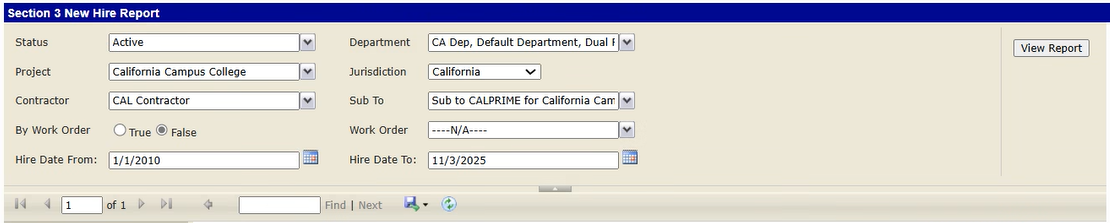
Report Sample: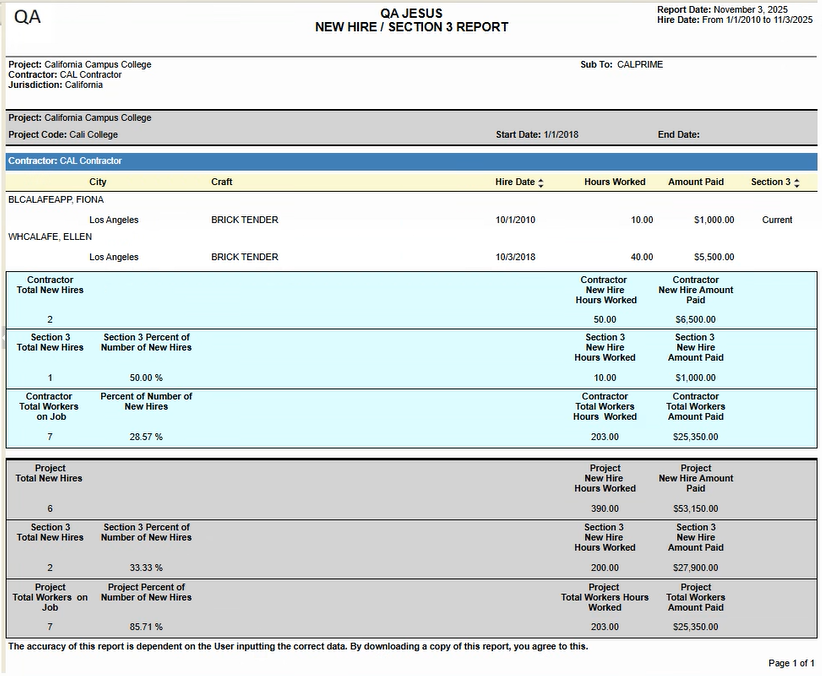
Was this article helpful?
That’s Great!
Thank you for your feedback
Sorry! We couldn't be helpful
Thank you for your feedback
Feedback sent
We appreciate your effort and will try to fix the article