Workforce Manager – Release 62
Workforce Manager Release Highlights
Brief Overview
Release 62 introduces two major enhancements designed to improve customer autonomy, strengthen data protection, and ensure secure staff–customer interactions. Workforce Manager users now have seamless access to Knowledge Base resources directly within the application, along with enhanced Co‑Browse protections that safeguard sensitive personal information during support sessions.
Knowledge Base Integration
Workforce Manager now includes a fully integrated Knowledge Base panel. Users can now access step‑by‑step guides, feature explanations, training materials, and workflow instructions without closing out their Workforce Manager application.
Why This Matters
- Faster Support & Self‑Service – Users gain immediate access to documentation that helps them complete tasks quickly and independently.
- Consistent Training – Administrators and coordinators use standardized material ensuring the entire team receives uniform guidance.
- Reduced Support Requests – Critical “how‑to” answers appear within the application at the exact moment the user needs them.
- Better Onboarding – New customers experience faster time‑to‑value through structured, embedded learning material.
What’s Included
The Knowledge Base provides content organized by module and topic, including:
- Intake & Assessment guides
- Referral & Placement tutorials
- Portfolio/Profile documentation
- Supportive Services guidance
- Troubleshooting materials
- Feature‑specific PDF user guides
How to Access in Workforce Manager
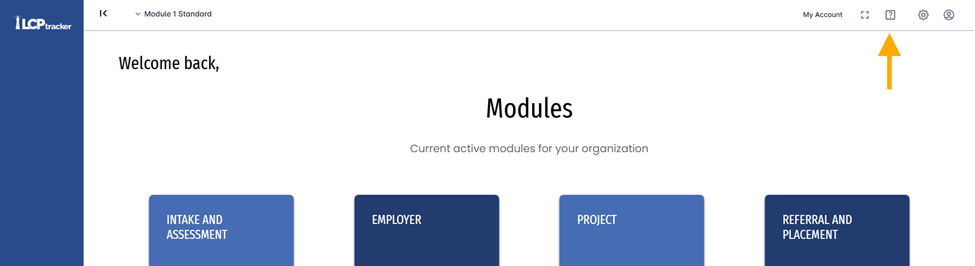
- Log into Workforce Manager.
- Open the Left Navigation menu in any screen
- Select Support → Knowledge Base.
- Choose your topic or use the search panel to find documentation relevant to the feature or workflow you’re completing.
Updated Co-Browse Functionality (enhanced privacy and security)
What This Enhancement Is
The Co‑Browse feature has been updated to ensure that during support sessions, sensitive user information is obfuscated by default for all LCPtracker staff members assisting customers. This prevents accidental visibility of personal data while still allowing support teams to guide users effectively.
Why This Matters
- Stronger Customer Security – Protects PII (Personally Identifiable Information) in real‑time.
- Trust & Compliance – Supports privacy expectations for government clients and high‑compliance programs.
- Safer Troubleshooting – Staff can walk users through processes without ever seeing their confidential data.
- Consistent Experience – Mirrors the security approach used in other LCP products like LCP
What Is Obfuscated
When Co‑Browse is enabled, Workforce Manager automatically hides the following fields across both.
- Intake and Assessment modules for Workforce and Apprentice/Outreach:
- Names (First, Last, Middle)
- Full address (Address, City, State, ZIP)
- Email address
- SSN
- Date of Birth
- Citizenship & immigration information
- Justice‑related fields (Conviction Type, Disposition)
- Disability fields
- Engagement note summaries
- Referral & Placement Module:
- Participant Name
- SSN
How It Works in the Application
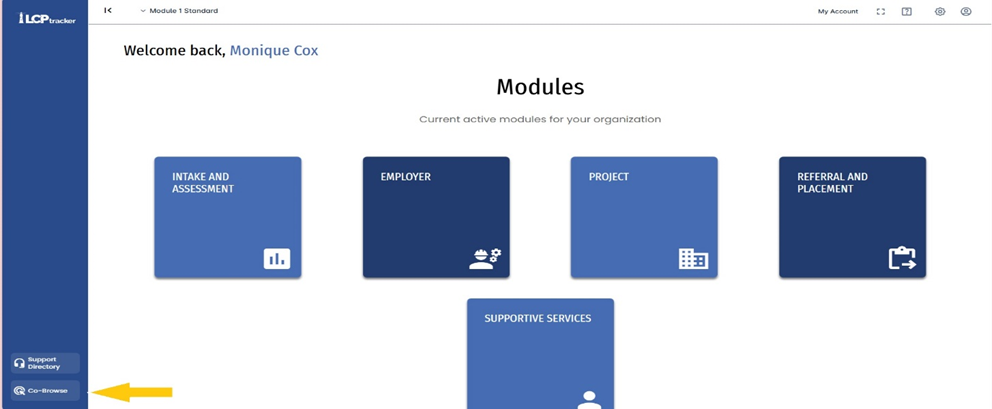
- Customer initiates or accepts a support Co‑Browse session from the side menu, bottom left.
- The application automatically activates the Obfuscation Layer after the team member is given a code.
- Sensitive fields become unreadable to LCPtracker staff but remain fully visible to the customer.
- Staff can guide navigation without viewing, storing, or transmitting customer PII.
Value to Customers
- Protects confidential participant data.
- Reduces compliance risk for agencies and other organizations.
- Enables rapid support without compromising privacy.
Was this article helpful?
That’s Great!
Thank you for your feedback
Sorry! We couldn't be helpful
Thank you for your feedback
Feedback sent
We appreciate your effort and will try to fix the article